Four people, one file, and nobody’s name on anything
You are running the business out of a shared spreadsheet that four people edit and nobody entirely trusts. Every row has a state. None of them has an owner.
Work boards are on the Business plan. Every plan, including the 30-day trial, includes task boards and daily tasks.The spreadsheet was never the problem — the four people editing it were.
- A shared file cannot tell you who owns a row. It can only tell you whose initials somebody typed into a cell, once, in March.
- It cannot tell you what state a row is in — only what the last person to open it believed the state was.
- And it cannot tell you whether any of it changed since the last time you looked.
A board is still columns, rows and groups. Nobody has to learn a new way to think — the work just stops living in a file that four people are editing at the same time.
The board matches the work, not the other way round
Status, owner, due date, or whatever your process actually needs. These are the seven columns on the board below — and four of them carry the whole argument.
Owner. A people cell. The row carries a person — not a name somebody typed into a text box — which is why the same person is the same colour everywhere on the board.
Status + Priority. Both are columns like any other, so the board carries the states your process has rather than a fixed set it was shipped with. This team runs two of them. Another process defines different ones.
Task Status. A dash in all ten rows below. A column can exist before anybody fills it in, which is only possible if the columns are yours to define.
+ Add Column. An eighth column is a column. Not a feature request, not a workaround, not a second spreadsheet beside the first one.
- Item
- Owner
Owner. A people cell. The row carries a person — not a name somebody typed into a text box — which is why the same person is the same colour everywhere on the board.
- StatusPriority
Status + Priority. Both are columns like any other, so the board carries the states your process has rather than a fixed set it was shipped with. This team runs two of them. Another process defines different ones.
- Due date
- Progress
- Task Status
Task Status. A dash in all ten rows below. A column can exist before anybody fills it in, which is only possible if the columns are yours to define.
- + Add Column
+ Add Column. An eighth column is a column. Not a feature request, not a workaround, not a second spreadsheet beside the first one.
Shut a group and the board reflows. No JavaScript — it is a plain HTML <details>.
In progress5 items
| Item | Owner | Status | Priority | Due date | Progress | Task Status |
|---|---|---|---|---|---|---|
| Onboarding flow revamp3 | Mei Lin | Working on it | High | 12 Sept 2026 | 65 | —empty |
| Migrate legacy contracts to e-sign | Jonas Weber | Working on it | High | 19 Sept 2026 | 40 | —empty |
| September payroll dry run2 | Sofia Petrov | Working on it | High | 25 Sept 2026 | 30 | —empty |
| Annual leave policy update | Rana Kaur | Stuck | Medium | 15 Sept 2026 | 20 | —empty |
| Desk and equipment audit | Daniel Okafor | Working on it | Low | 30 Sept 2026 | 55 | —empty |
Up next5 items
| Item | Owner | Status | Priority | Due date | Progress | Task Status |
|---|---|---|---|---|---|---|
| Q4 hiring plan for engineering | Jonas Weber | Not started | High | 5 Oct 2026 | 0 | —empty |
| Manager 1:1 training sessions | Mei Lin | Not started | Medium | 12 Oct 2026 | 0 | —empty |
| Benefits renewal comparison | Sofia Petrov | Not started | High | 1 Oct 2026 | 10 | —empty |
| Office move logistics2 | Daniel Okafor | Not started | Low | 20 Oct 2026 | 0 | —empty |
| Update employee handbook | Rana Kaur | Not started | Medium | 15 Oct 2026 | 5 | —empty |
TRY IT — TAP A GROUP HEADER TO CLOSE IT
Ten rows is readable. Forty is not, and a shared sheet only ever grows.
The group is the thing that keeps it readable. Shut the one you are not working on and the rest comes up to meet you.
Nothing was deleted and nothing moved. The same ten rows are still there, one click away.
The same board, in Shiftena
People Ops Q3 Roadmap — the board every row on this page was copied from. The hand-built cells above carry the same values a shade darker, so white text on them clears the contrast bar.
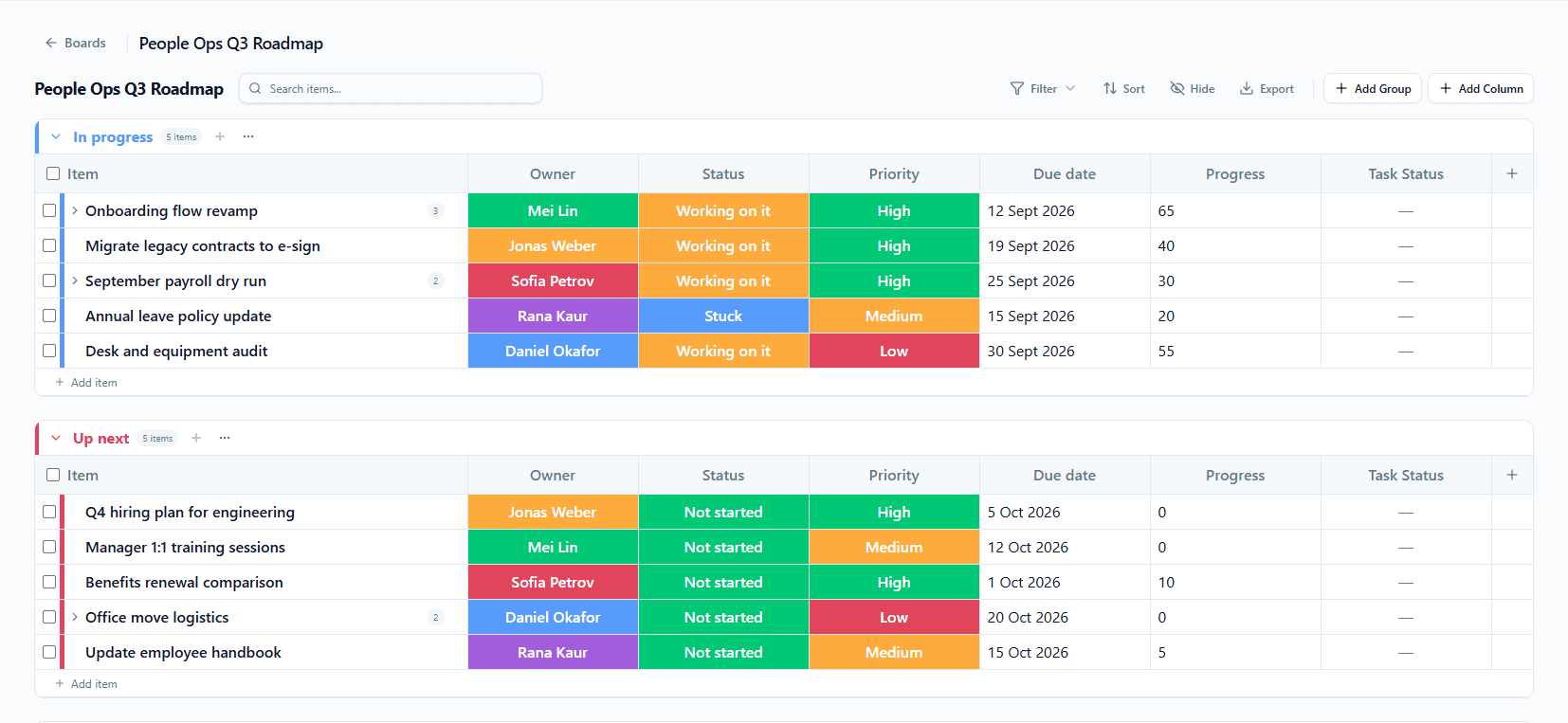
Scroll the screenshot sideways to see all seven columns →
Three of these rows sit beside other pages of this site
A row is a job somebody on the ops team is doing this quarter — it is not a feature, and the board does not do the job for them. But the part of Shiftena that work ends up in is one click away, because that is what an ops team spends its quarter on.
And because tasks and time tracking share one workspace, the hours those rows took sit against the same person and the same week. Time tracking is its own feature, on Growth and above.
The colour belongs to the person, not the row.
Mei Lin is the same colour in both groups. So is Jonas Weber. You can check that in the screenshot one section up — the colour follows the person from row to row, because the cell holds a person rather than a string somebody typed.
Which makes ownership a value in a cell, not a convention somebody has to remember. An unowned row is visible at a glance, from across the room, without reading a single word.
Who can change this board is a different question →Work boards are on Business. That is the top plan, and we are not going to bury it.
The board is the thing the top plan is for. If that is more than your team needs this quarter, the rest of the workspace is on every plan and we would rather you knew that now.
Every plan includes task boards and daily tasks, including the 30-day trial. The Business feature is this one — the spreadsheet-style board with columns you define, rows grouped the way you work, and a person in the owner cell.
Work boards, answered
- Which plan are work boards on?
- The Business plan — the top tier. One thing worth knowing now rather than discovering later: every plan, including the 30-day free trial, includes task boards and daily tasks. The Business feature is this specific thing, the spreadsheet-style board with columns you define, rows grouped the way you work, and a person in the owner cell.
- Does everything have to move off the spreadsheet at once?
- No, and what transfers is the structure rather than the file. A board is columns, rows and groups — the same three things your sheet already has. Put one process on a board, leave the rest where it is, and move the next one when it suits you.
- Can we define our own columns?
- Yes. Status, owner, due date, or whatever your process actually needs — the board matches the work rather than the other way round. The board on this page runs seven columns, and one of them holds nothing but a dash in every single row, because a column can exist before anyone uses it.
- Can we group by something other than stage?
- Yes. Group rows by team, stage or client, and the board stays readable as it grows. The example board groups by stage because that is how that team works, not because stage is the only option.
- Are the hours spent on these rows tracked here too?
- Tasks and time tracking share one workspace, so the work and the time it took sit against the same person and the same week. Time tracking itself — work sessions recorded from the desktop app — is a Growth-and-above feature with its own page.
- Who can see or change a board?
- That is roles and permissions, which is a different question from ownership. Access is granted per resource rather than by a blunt admin-or-not switch, and team scope decides who a role applies to. The owner cell says who owns the row; permissions say who can touch the board.
What sits next to it
The board is one page of the same workspace. These are the others.
The file four people are editing right now, as ten rows with a name on every one.
Same columns, same rows, same groups — except the state is shared, the owner is a cell, and nobody has to ask which copy is the current one.
Work boards are on the Business plan · Task boards and daily tasks are on every plan · No card needed.