Screenshots that stop when the clock stops
Proof of effort for work nobody can stand over — not surveillance of a person. The desktop app captures roughly every ten minutes while a task is running, and nothing at all when it is not.
On Growth and Business · Not on Free Trial or Starter.There is no third state in which it captures without a task running.
Right now, the invoice is the evidence.
Teams working with remote contractors they have never met, where an invoice is currently the only evidence of the work.
This category has a bad reputation. Most of it is earned.
Software that watches people has earned the suspicion it gets, and a page that pretends otherwise is not worth your time.
The useful question was never whether a tool can watch someone. It is where the line sits, and who holds it. On this page the line is the task clock — and the person holding it is the person doing the work.
The same rule for the owner as for everyone else.
Paused or off the clock means no capture. The employee starts and stops it, and the rule is the same for everyone — which is what makes it a rule rather than a policy somebody can waive.
- No task running means nothing for a capture to attach to, so nothing is captured.
- Capture follows the employee’s own task clock — the same rule for everyone, owners included.
- Capture comes from the desktop app the person started themselves, on Windows or macOS.
- Employeetheir own start and stopEmployee: starts and stops it themselves, and is captured only while their own task runs.
- Team leadtheir own start and stopTeam lead: starts and stops it themselves, and is captured only while their own task runs.
- Ownertheir own start and stopOwner: starts and stops it themselves, and is captured only while their own task runs.
The same control, three times. If one of these rows had an extra button on it, this page would be about something else.
Three hours of one afternoon, to scale.
Every mark below is one of the ten captures further down this page, placed at the minute its own file name says it was taken. The long empty stretch is not a rendering gap: nothing at all was captured for 75m 54s.
- 13:09:18
- 14:25:12
- 14:27:15
- 14:42:45
- 14:48:22
- 15:04:50
- 15:15:08
- 15:18:34
- 15:30:10
- 15:42:53
Eight intervals follow the gap — 2m 03s · 15m 30s · 5m 37s · 16m 28s · 10m 18s · 3m 26s · 11m 36s · 12m 43s. That averages 9m 43s across those eight, and not one of them is exactly ten minutes. The whole run spans 2h 33m 35s.
Read off the file names of the ten captures below — 13:09:18 to 14:25:12 is 4554 seconds, written here as 75m 54s rather than rounded to the minute. What the shot proves is that nothing was captured in that window; it does not report what the machine was doing, so neither does this page.
The ten the ruler was plotting
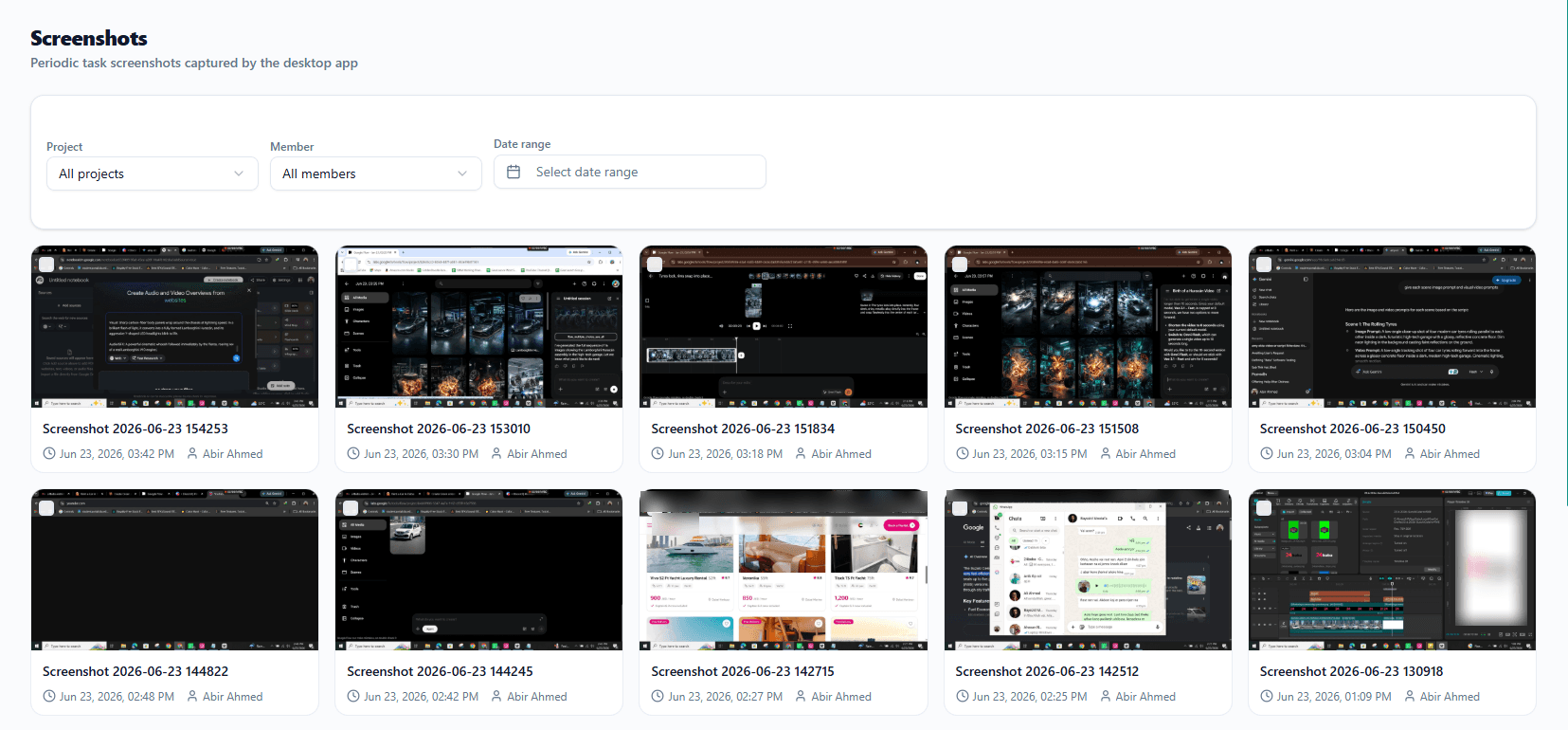
One member, one day. Every card carries its file name, the moment it was taken and the member it belongs to — which is what makes a capture checkable rather than merely alarming.
The same ten stamps, in clock order. The gallery lists them newest first, so the rail and the cards run in opposite directions.
Three controls, and the same stamp on every card.
Nothing in the gallery above is filtered, which is why all ten cards are showing. These are the controls across the top of it, rebuilt at reading size.
That is one real card, copied field for field off the right-hand end of the bottom row. The file name is the timestamp, which is the only reason the ruler above can be checked against the picture rather than taken on trust.
What it never captures
Three statements, each in exactly the scope the product itself uses. Nothing here has been widened to sound better on a marketing page.
A capture is part of a session, not a loose image.
Captures sit in order against the session that produced them, so a reviewer sees a sequence rather than a folder of disconnected pictures. The session already belongs to a task, and the task to a project, so a capture arrives with its context attached — one capture on its own proves very little.
The tiles are placeholders rather than images, and how many there are means nothing — the shot does not show how captures are grouped into sessions, so this diagram does not claim it. The real sequence is the one in the gallery above.
Worth being plain about: screenshots are periodic stills. Recording a session and summarising it is a different feature with its own page, and this one does not promise it.
On Growth and Business — and you should know that now, not at checkout.
Screenshots arrive together with time tracking, as one feature. If the plan you are looking at is not in the first row below, it does not include them.
Attendance, leave and the holiday calendar are on every plan, including the trial. If what you want is the clock without the captures, attendance is already enough.
Screenshots, answered
When does Shiftena take a screenshot?
Only while a task is running in the desktop app, and then roughly every ten minutes. Paused or off the clock means no capture at all. In the afternoon shown on this page nothing at all was captured for 75m 54s between the first capture and the second.
Who starts and stops the capture?
The employee does, by starting and stopping their own task. Capture follows the employee's own task clock — the same rule for everyone, owners included.
Do you record keystrokes, the microphone or the camera?
No to all three. No keystrokes, no microphone and no camera — and no browsing history outside a running task. What the feature adds is a periodic screenshot while a task is running.
Is it exactly every ten minutes?
No, and this page shows the measurement rather than claiming otherwise. The nine captures after the 75m 54s gap are spaced 2m 03s, 15m 30s, 5m 37s, 16m 28s, 10m 18s, 3m 26s, 11m 36s and 12m 43s apart — an average of 9m 43s across those eight intervals, and not one of them exactly ten minutes. Roughly every ten minutes is the honest description of the interval.
Where do the screenshots end up?
Against the work session that produced them, inside the task and project that session belongs to, so a reviewer sees captures in order rather than a folder of loose images. They are also listed on one page you can filter by project, member and date range.
Which plans include screenshots?
Growth and Business. Screenshots are not on Free Trial or Starter — they arrive together with time tracking, as one feature. Attendance, leave and the holiday calendar are on every plan, so a team that wants the clock without the captures already has it.
What sits next to it
Screenshots are never bought on their own: they unlock with time tracking, on the same two plans, and everything below shares the workspace they both write into.
It runs when they start it. It stops when they stop it.
Outside that, it has nothing to show you — and a team is far more willing to run something whose limits they can state in one sentence.
Screenshots are on Growth and Business · Free for 30 days · No card needed.