Attendance tracking that doesn’t run on anyone’s memory
Right now the record of who actually worked Tuesday lives in three places — a group chat, a half-updated sheet, and whatever people remember on Friday.
Included on every plan, including the 30-day free trial · No terminal, no badges, no card needed.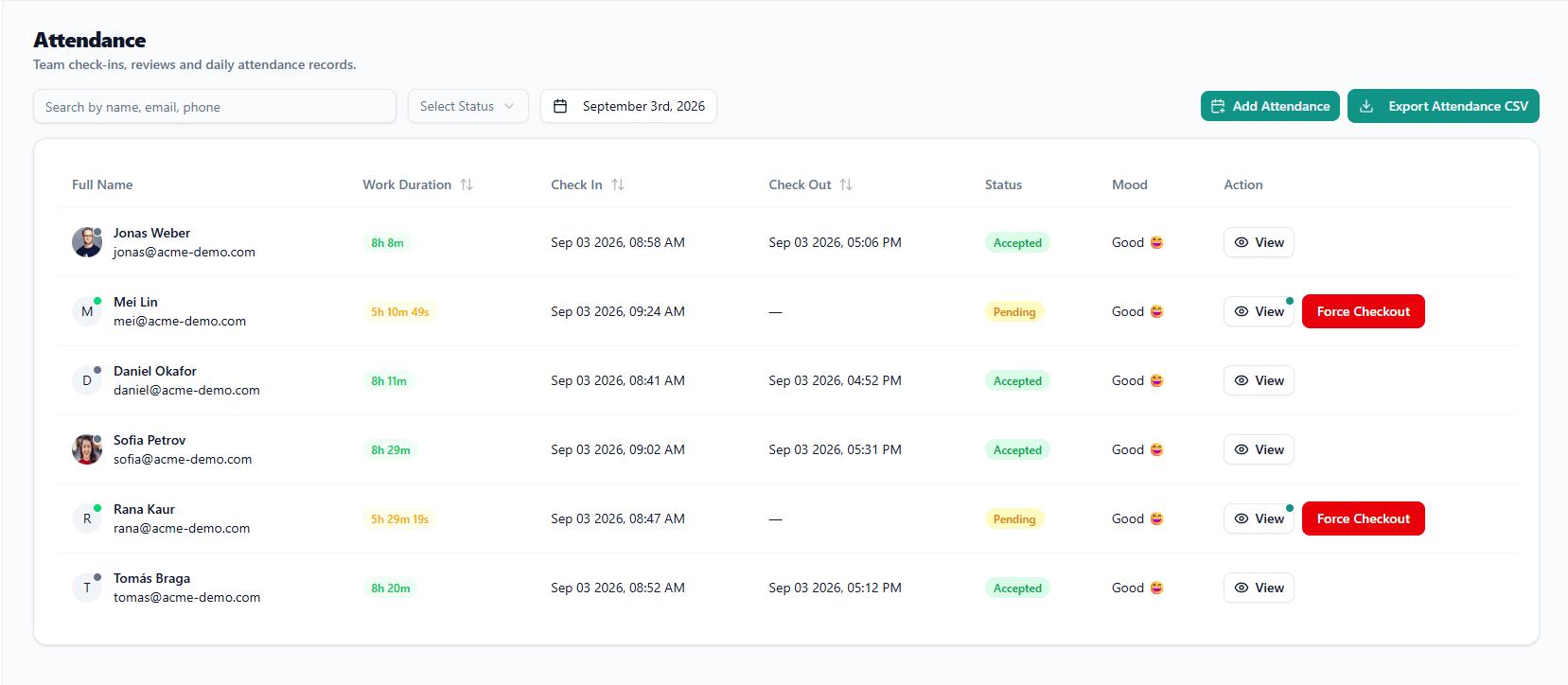
By Friday, everybody’s Tuesday is a guess.
The left-hand column is not a strawman. It is what the record actually consists of when nobody is running attendance software, and the people producing it are busy, not careless.
CHAT MESSAGE
sir am coming, trafficreceived 09:41
SPREADSHEET
MEMORY
Jonas was in early — nine? half nine?
CHAT MESSAGE
taking the afternoon, told you last weekreceived 13:02
SPREADSHEET
NOTHING
| Name | In | Duration | Status |
|---|---|---|---|
| JJonas Weber | 08:58 | 8h 8m | Accepted |
| MMei Lin | 09:24 | 5h 10m 49s | Pending |
| DDaniel Okafor | 08:41 | 8h 11m | Accepted |
| SSofia Petrov | 09:02 | 8h 29m | Accepted |
| RRana Kaur | 08:47 | 5h 29m 19s | Pending |
| TTomás Braga | 08:52 | 8h 20m | Accepted |
The right-hand version cost nobody any extra effort. Six people tapped a button.
Two taps a day, and that’s the whole ask of your team.
Check in when they start, check out when they finish. Everything else on this page is built out of those two taps.
- Check in and out from the web app or the desktop tracker — whichever one is already open.
- Nothing to install for anyone who only needs to check in and out.
- People do it themselves. No manager standing at a door marking a register.
- The record is written the moment they tap, not reconstructed on Friday afternoon.
In the browser there is nothing to install. On Windows and macOS the free tracker does the same thing from the taskbar, for people who would rather start the day in one place.
Who is in, who is late, who is on leave — one screen.
You answer “is Rana in today?” by looking, not by asking — and looking doesn’t interrupt Rana.
A record anyone can change silently is not a record.
Corrections are normal. People forget to check out, a laptop dies, someone spends the morning on a client site. The question was never whether attendance gets edited — only whether the edit leaves a name and a timestamp behind it.
- Who changed it and when, kept with the row itself, not in a separate log nobody opens.
- An approved leave day marks the attendance record, so an approved absence never reads as a no-show.
- Editing is governed by roles and permissions, not by convention.
- The day exports to CSV straight from the board.
- MMei Linin 09:24 · out —PendingForce Checkout
- RRana Kaurin 08:47 · out —PendingForce Checkout
What an edit trail looks like
EXAMPLE- Checked in at 08:41by the employee, from the desktop tracker
- Session force-closedby a manager, from the board — the original check-in is kept
- Check-out corrected to 17:12by a manager, stored with their name and the moment they made it
What a day’s record looks like
One person, one day, and the fields this page is about. The sample values are Jonas Weber’s row from the board above — including the two that are empty for him.
- Check-in time
- Sep 03 2026, 08:58 AM
- Check-out time
- Sep 03 2026, 05:06 PM
- Work duration
- 8h 8m
- Status
- Accepted
- Edit history
- none
- Leave marker
- none
Attendance never records
- Location or GPS
- Keystrokes
- Browsing history
- Microphone or camera
- Anything on the device
Screenshots and work-session recording are a separate feature on Growth and above, with their own page.
See how screenshots work →Approved leave marks itself
An approved absence should never surface a month later as a no-show. Reconciling two separate lists at month end is where small teams lose an afternoon they do not get back.
- An employee requests leave and sees their own remaining balance without asking anyone.
- A manager approves once, and the attendance record follows automatically.
- A public-holiday calendar lives alongside it, so the days your company observes are already there.
Attendance is never the thing you pay more for.
No per-seat attendance add-on, and no “contact sales” to see your own team’s check-ins. The trial is the full attendance feature, limited only by team size and storage.
What sits next to it
Attendance is one page of the same workspace. These are the others.
Attendance, answered
Do we need a biometric or card terminal?
No. There is no hardware at all. People check in from the web app in a browser, or from the free desktop tracker on Windows and macOS. Nothing to buy, nothing to mount on a wall, nothing to replace when someone loses a badge.
Does it track anyone's location?
No. Attendance records a check-in time, a check-out time and the duration between them. There is no GPS, no location and no geofence anywhere in the feature.
Can a manager fix a wrong check-in?
Yes, and the fix carries a name. The correction is stored with the name of whoever made it and the moment they made it, so a manager can put a wrong time right but cannot do it quietly.
What happens if someone forgets to check out?
You force the checkout from the board — that is the red button on the row — and then correct the time to when they actually finished. The original check-in stays, and the correction carries a name. Forgotten check-outs are the usual reason to edit a row.
Is attendance included on every plan?
Yes, in full, including the free 30-day trial. Attendance, leave and the holiday calendar are baseline features. Plans differ on team size, storage and the extras built on top, never on whether your team can check in.
Do you take screenshots as part of attendance?
No. Screenshots and work-session recording are a separate feature on Growth and above, with their own page. Attendance on its own captures nothing but the times.
Tomorrow’s attendance, recorded as it happens.
Set the team up this afternoon, everyone checks in with one tap in the morning, and the day writes itself — no hardware to order and nothing to install for check-in.
Free for 30 days · No card needed · No biometrics, no badges, no GPS.